Managing Multiple AWS Environments with Ease: Sceptre and AWS CDK in Harmony

You probably know about AWS CDK: “The AWS Cloud Development Kit (AWS CDK) lets you define your cloud infrastructure as code in one of its supported programming languages.“; Sceptre (open source tool by Cloudreach) adds an extra layer of power for DevOps engineers: “Sceptre is a tool to drive CloudFormation. Sceptre manages the creation, update and deletion of stacks while providing meta commands which allow users to retrieve information about their stacks.

As you see, they both have something important in common: CloudFormation. the output of an AWS CDK program is an AWS CloudFormation template and Sceptre leverages CloudFormation templates to streamline stack deployments. Think of Sceptre as the conductor that orchestrates your CDK-defined infrastructure across multiple environments. It lets you focus on writing concise CDK code while Sceptre handles the environment-specific configurations and deployments. I found this article in Dev community website a good and brief explanation about Sceptre. The good news is that Sceptre supports AWS CDK as templating source. The following diagram makes it clear how this works:

Managing diverse environments such as Development, Test, Acceptance, Staging and numerous production clusters with unique configurations can be a nightmare. Sceptre saved my day by simplifying deployments across them all using the same infrastructure code (plain CloudFormation templates, Troposphere or CDK)! Also, separating configuration plane from code plane and ability to pass parameters across the stacks makes it very useful for DevOps teams. I used troposphere for templating but its development lost its momentum and couldn’t keep up with official CloudFormation updates. So, when I heard about AWS CDK support in Sceptre, it was like dream comes true!

I gave it a try and I’m very happy with it. I didn’t have to change anything in the existing code but instead leveraged AWS CDK for new stacks. Amazingly, cross-stack references, hooks, parameter handling features all worked as before. This is possible because of modular design of sceptre and its reusability capabilities.

Now, Let’s have a look at an example. The following python code creates a simple OpenSearch cluster using its CDK construct:

from aws_cdk import CfnOutput, CfnParameter
from aws_cdk import aws_certificatemanager as acm
from aws_cdk import aws_route53 as r53
from aws_cdk import aws_iam as iam
from sceptre_cdk_handler import SceptreCdkStack
from aws_cdk import aws_opensearchservice as opensearch
from aws_cdk import aws_ec2 as ec2


# Important: Notice how it subclasses SceptreCdkStack and passes **kwargs into the base class's
# __init__(). This is important to maintain compability with the different deployment_types.
class OpenSearchStack(SceptreCdkStack):
def __init__(self, scope, id: str, sceptre_user_data: dict, **kwargs):
super().__init__(scope, id, sceptre_user_data, **kwargs)
# If you want to pass parameters like you do elsewhere in Sceptre, this works great!
self.num_data_nodes = CfnParameter(self, 'NumOfDataNodes', type='Number')
self.data_node_type = CfnParameter(self, 'DataNodeType')
self.data_node_size = CfnParameter(self, 'DataNodeSize', type='Number')
self.os_username = CfnParameter(self, 'Username', default='flybits-admin')
self.warm_node_type = CfnParameter(self, 'WarmNodeType', default='ultrawarm1.medium.search')
self.master_node_type = CfnParameter(self, 'MasterNodeType', default='r5.large.search')

self.num_az = int(sceptre_user_data['NumOfAZs'])
self.version = sceptre_user_data['Version']
self.num_of_warm_nodes = sceptre_user_data['NumOfWarmNodes']
self.num_of_master_nodes = sceptre_user_data['NumOfMasterNodes']

if self.num_of_warm_nodes == 'None':
self.num_of_warm_nodes = None
if self.num_of_master_nodes == 'None':
self.num_of_master_nodes = None


slr = iam.CfnServiceLinkedRole(
self, "Service Linked Role",
aws_service_name="es.amazonaws.com"
)

self.os_domain=opensearch.Domain(self, "OS_Domain",
version=opensearch.EngineVersion.open_search(version=self.version),
enable_version_upgrade=True,
capacity=opensearch.CapacityConfig(
data_node_instance_type=self.data_node_type.value_as_string,
data_nodes=self.num_data_nodes.value_as_number,
warm_nodes=self.num_of_warm_nodes,
warm_instance_type=self.warm_node_type.value_as_string,
master_nodes=self.num_of_master_nodes,
master_node_instance_type=self.master_node_type.value_as_string,
),
zone_awareness=opensearch.ZoneAwarenessConfig(
availability_zone_count=self.num_az
),
ebs=opensearch.EbsOptions(
volume_type=ec2.EbsDeviceVolumeType.GP3,
volume_size=self.data_node_size.value_as_number
),
encryption_at_rest=opensearch.EncryptionAtRestOptions(
enabled=True
),
node_to_node_encryption=True,
enforce_https=True,

fine_grained_access_control=opensearch.AdvancedSecurityOptions(
master_user_name=self.os_username.value_as_string,
)
)

self.resource_arn = self.os_domain.domain_arn + "/*"
self.os_domain.add_access_policies(iam.PolicyStatement(
actions=["es:*"],
effect=iam.Effect.ALLOW,
principals=[iam.AnyPrincipal()],
resources=[self.resource_arn]
))

its sceptre configuration looks like the following:

template:
type: cdk
# The path is always within your project's templates/ directory.
path: logging/opensearch.py
deployment_type: bootstrapless
bootstrapless_config:
file_asset_bucket_name: !stack_attr template_bucket_name
# It can be useful to apply the same prefix as your template_key_prefix to ensure your
# assets are namespaced similarly to the rest of Sceptre's uploaded artifacts.
file_asset_prefix: "cdk-assets"
class_name: OpenSearchStack

# Parameters are DEPLOY-TIME values passed to the CloudFormation template. Your CDK stack construct
# needs to have CfnParameters in order to support this, though.
parameters:
NumOfDataNodes: "2"
DataNodeType: "r6g.large.search"
DataNodeSize: "100"

sceptre_user_data:
NumOfAZs: "2"
RoleNeeded: true
Version: "2.7"
NumOfWarmNodes: None
NumOfMasterNodes: None

In specific look at the flexibility of introducing values for parameters in code. In sceptre we have 2 ways of passing values: first is parameters which is equivalent to setting values for CloudFormation parameters and the other is sceptre_user_data which is specific to sceptre and its resolvers take care of assigning the values in code. I brought both in code to show their use case. In specific, for variables like NumOfWarmNodes which their value can be a number or None , you can’t use parameters because it doesn’t accept 2 different types; instead sceptre_user_data is very helpful and you can easily assign None or a Number (please see the code)

As conclusion, if you are already using CloudFormation or AWS CDK and you are looking for a flexible and structured way of managing multiple environments using the same infrastructure as code, a combination of Sceptre and AWS CDK is highly recommended.
Karpenter in EKS and CloudTrail Events

We recently started to migrate from CAS (Kubernetes AutoScaler) and EC2 ASG (AutoScaling Groups) to Karpenter in some of our EKS clusters. So far so good and I’m happy with the results, especially because of excellent use of Spot instances 🙂 and reducing our EC2 costs but I noticed something interesting about CloudTrail logs.

I noticed that our CloudTrail costs in the accounts with Karpenter are slightly increased. Looking closer, I saw a lot of UpdateInstanceInformation Events and the Identity source for these events was Karpenter Node Role making calls to AWS SSM. It makes sense because Karpenter actually comes with SSM agent and SSM Agent calls this API in Systems Manager service every 5 minutes to provide heartbeat information. So, if you configured CloudTrail to log all management events, you will see this event more often when you have an EKS cluster with Karpenter.

Using Account Factory for Terraform in Control Tower

Recently I worked on a governance project and I decided to take a look at AWS Control Tower. I found it much more mature than few years ago with good documentation. Also, Landing Zone is integrated in Control Tower which is really nice.

Having said that, especially when it comes to automation using code, Control Tower needs some improvements. Basically, there is no API for Control Tower and things such as creation and managing guardrails in CT can’t be done using code.

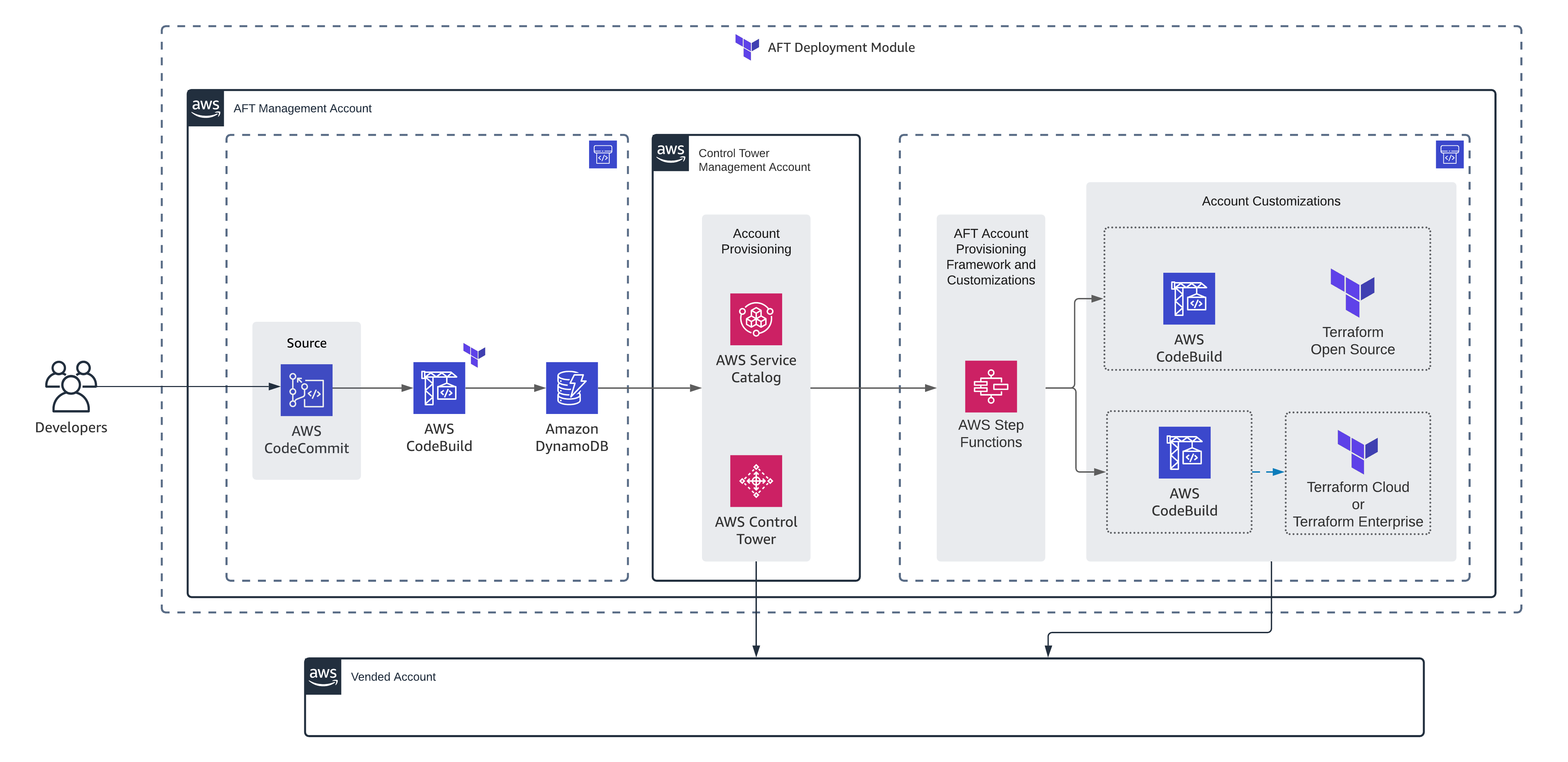
Although some operations in Control Tower can be automated. One of the nice things in Control Tower is Account Factory which enables us to create and manage AWS Accounts in an Organization’s landing zone. Even nicer, there is a GitOps model to automate the processes of account provisioning and account customization in AWS Control Tower, named Account Factory for Terraform (AFT). The official document explains how to deploy AFT very well. It will create a couple of lambda functions and pipelines; also Step functions and Service Catalog are configured in a way to process requests to create and manage AWS Accounts using Terraform.

When Account Factory is deployed, we need to work with 4 repositories that will trigger pipelines; each repository is responsible for a specific operation. For example, to create a new AWS Account you have to use aft-account-request repository. It uses a Terraform module with the same name and usually works well, considering you followed the documentation.

So far so good but if something goes wrong, the troubleshooting is a bit hard because this terraform module is very simple and you have to have a good understanding of how the whole workflow works to be able to troubleshoot. Let me give an example: when I was pushing one request to create a new AWS account, I wrote the name of organization unit (OU) all lower case while apparently the name of OU is case sensitive. When I pushed the code, terraform pipeline succeeded with no error because it just inserts a key/value pair in a DynamoDB table but obviously no account was created. To troubleshoot, I had to go over the whole procedure and check the logs of lambda functions and code builds to figure out the root cause of the issue. It was a great experience for me and gave me a deep knowledge of the procedure but it can be difficult for operators who don’t have access to those lambda functions and Codepipelines which are located in sensitive AWS Accounts.

As I’ve shown, if you are planning to use AFT, don’t rely only on terraform pipelines and think about some ways to facilitate troubleshooting. For example, I would recommend publishing all the logs of lambda functions, AWS Step Functions and AWS Codebuild projects to a log collector and let operators observe those logs even if terraform apply succeeds.

AWS Managed Prometheus and Grafana

AWS re:Invent 2020 is in progress and it’s full of introducing new services. For people like me who work day by day on both public cloud services (AWS in specific) and cloud native ecosystem, introductions of 2 services related to Observability were very interesting:

They are in Preview but AWS provides it to all users already. Of course they may be subject to changes and not recommended for production.

I really like such services because there is no vendor locking concern and like other managed services can be used at scale. Other advantages are integration with other services including IAM. Although there are solutions for scalability or securing these services but they are not easy to implement and the cost of maintaining them can be high.

I’m really excited to see how they work in practice but I wanted to share my view with you, maybe you are quicker than me in employing them and playing around 🙂

AWS ECS CloudFormation Timeout

This is more an informational post that may help others to feel less miserable in the same situation as I was! The scenario is this:

You are updating an ECS cluster via AWS CloudFormation but for whatever reason the cluster doesn’t stabilize. So, you see the stack is in UPDATE_IN_PROGRESS state and you don’t receive any message in CloudFormation Events page. If you can’t troubleshoot the issue with ECS and take no action, It will take 3 hours before CloudFormation timeouts and display a message! At this point, as you can guess, CloudFormation will rollback. Situation can be even worse if Rollback can not be proceeded successfully (in our case, there was a lack of resources preventing update and rollback). Again, CloudFormation will stuck in UPDATE_ROLLBACK_IN_PROGRESS state and will timeout after 3 hours! In a conversation I had with AWS support, they said this time is hard-coded and can’t be changed at the moment!

So, in such a situation: Keep Calm And Troubleshoot!

Lambda function for RDS Slow Query

Lambda functions are just another great tool provided by AWS to solve issues in a modern way! Using Lambda functions, you can run a micro service without a need to have a server and think of how to configure and maintain it!

There are lots of use cases for Lambda functions; here I used it to implement a service which sends alerts in case there is a slow query running in RDS. Of course slow queries are important for developers as it helps them to debug better and improve performance of the application. You can find the code here but there are some other things to be considered:

  • As you may know, there are some ways to trigger a Lambda function. In this case, using CloudWatch Events to schedule it periodically makes sense.
  • The lamda function should have some permissions to get RDS Logs and send alerts using SNS. To find out how to define required rules, please see this AWS documentation. You are also asked to do this when creating Lambda function.
  • There is a parameter named ‘distinguisher’ which is actually the keyword specifying the occurrence of slow query. For ‘Postgresql’ RDS it can be ‘
  • Parameters Group in RDS should be configured to log slow queries. To know how to do this please see AWS documentation or this guide:Enabling slow query log on Amazon RDS

ElasticSearch snapshot on S3

If you use ElasticSearch for Log analysis, you probably need to have backup and retirement strategy. It’s very handy to store a backup on a S3 bucket and configure lifecycle on that S3 bucket. I know there is a plugin (curator) that can do this but I preferred to use another approach and use ElasticSearch REST API’s. Here is a step to step guide about how to achieve this:

1) install AWS plugin:

https://www.elastic.co/guide/en/elasticsearch/plugins/current/cloud-aws.html

2) create repository in your Elasticsearch cluster:

curl -XPUT 'localhost:9200/_snapshot/backup_s3_repository?pretty' -d'
{
"type": "s3",
"settings": {
"bucket": "BUCKETNAME",
"region": "REGION",
"base_path": "DIRECTORY_NAME WITHIN BUCKET"
}
}'

Notes

  • AWS plugin should be installed on all nodes and services should be restarted to recognize plugin; otherwise you will get this error:

“Unknown [repository] type [s3]”

3) create snapshot:

curl -k -XPUT ‘https://localhost:9200/_snapshot/backup_s3_repository/snapshot_name?pretty?wait_for_completion=true’

4) create a cron job for taking snapshots (for step 3). You can skip `wait_for_completion=true` in cron job

5) Configure Lifecycle for that S3 bucket.

Open Source Concept and Public Cloud

I’m really a big fan of open source concept as I’ve seen its benefits in improving quality of the world we are living in. Especially in a country where access to high quality materials is hard, it’s the only legal and fair way to learn more and be able to contribute. The other way to access valuable data/tools actually is cheating! and I really hate that. I’m proud that I have never cheated in my whole educational life whereas it was really common to cheat and win! Open source development is also taking and giving which satisfies your spirit!

One of the things I really love working with public cloud (in specific, AWS) is its openness and nice documentation which enables everyone to implement their ideas that is in line with Open Source concept. In addition, AWS emphasis on DevOps and its integration with open source tools such as Chef, Packer, … has helped in fortifying open source culture in public cloud context. You can find great tools and utilities which are developed for AWS. In my next post, I will introduce a project that I have started and any contribution is more than welcomed!

Chocolatey cookbook issue with Packer

I recently had difficulties using Chocolatey chef cookbook to install packages on Windows 2012 R2 EC2 instances via Packer. For those who have issues, I would recommend to use an older version of chocolatey cookbook (12_5_fix). A solution is to modify Berksfile with the following:

cookbook 'chocolatey', git: "https://github.com/chocolatey/chocolatey-cookbook.git", branch: "12_5_fix"

AWS Solutions Architect Certification

On the new exciting journey that I started in public cloud, today I earned AWS Solutions Architect (Associate Level) certificate. It was a bit more challenging than what I expected but it was fun! For those who want to pass the exam, in my opinion despite what’s said about the focus of exam on VPC, RDS, high availability and scalability; the truth is that you should get familiar with almost all of the services and update yourself with new ones. For example, to my surprise I didn’t have any direct question about RDS but instead 5 or 6 questions about SQS and SWF and 1 question about Kinesis! I suppose questions are randomly selected and others may have different experiences but it’s a good idea to know basics of all the services. Of course, VPC, security, high availability and scalability are super important and you must be fluent in them but all I say is that they are not enough for passing the exam. Also, expect more scenario sort of questions which include different concepts rather than direct one sentence questions that you may find in internet.

So, if you are preparing for this exam, work harder and good luck!